





La utilería que muchos consideran la «navaja suiza» para las redes de comunicaciones.
Introducción
Esta página busca ser más un compendio de ideas y referencias en la utilización de Nmap, mas que un tutorial. Se incluye la descripción de la instalación y desinstalación en los diversos entornos en los que se ha probado esta herramienta, junto con algunos pormenores y detalles de todo ese proceso (por lo que por el momento, muchas salidas a pantalla serán presentadas en su totalidad, incluyendo algunos typos que serán eventualmente depurados).
Instalaciones
La instalación de Nmap puede hacer se varias formas, dependiendo del sistema operativo, principalmente, y luego los intereses o necesidades del usuarios. Estas forma comprenden:
- Con un instalador; lo que permite hacer uso de las funciones administrativas del sistema operativo para posteriores reparaciones o desinstalaciones.
- Mediante un administrador de paquetes.
- Compilando desde el código fuente.
Después de la instalación, el reinicio del equipo es algo recomendable de hacer, independientemente de la plataforma en donde se haya hecho.

Windows
La distribución para Windows disponible desde la página del proyecto incluye una interfaz gráfica y una distribución de Npcap (que no necesariamente es la última versión pero hace que ésta distribución de Nmap sea auto contenida pero uno puede optar por descargar Npcap también para contar con las últimas versione de ambas aplicaciones).
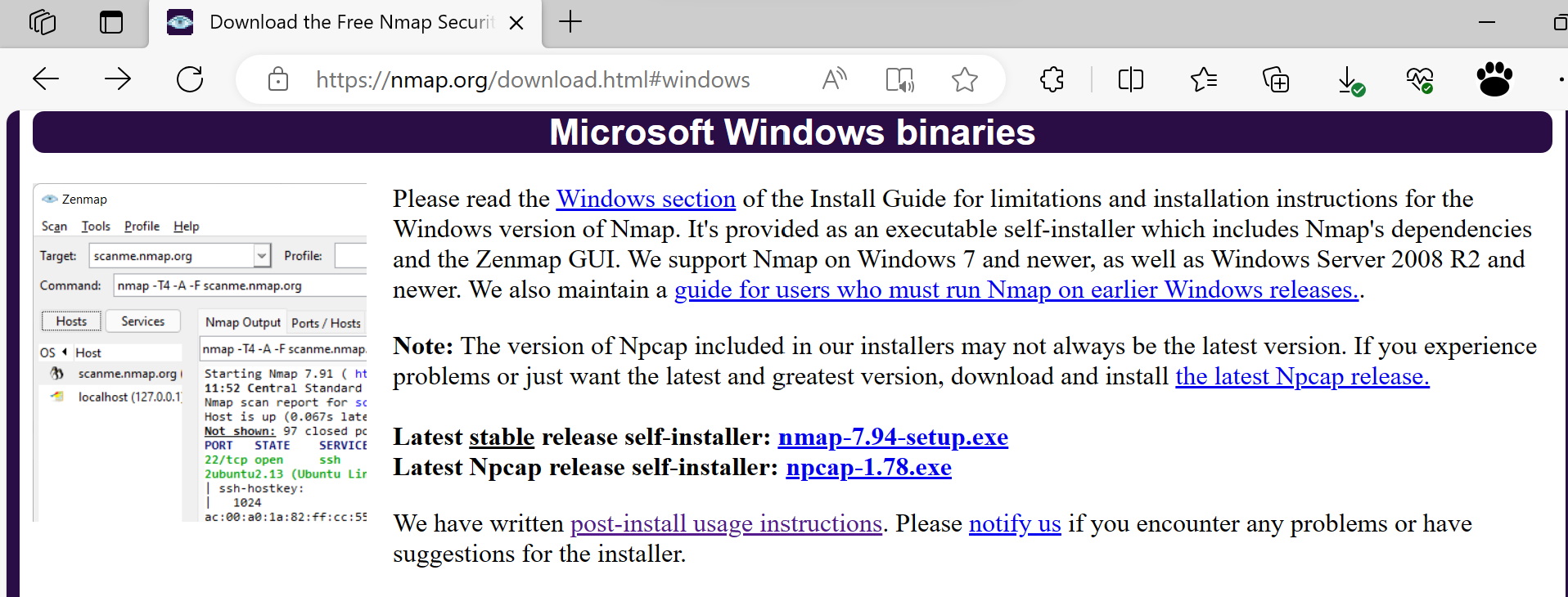


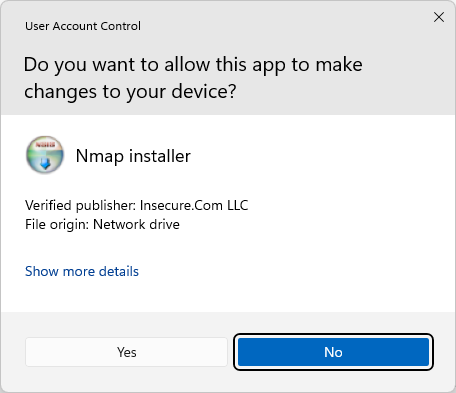
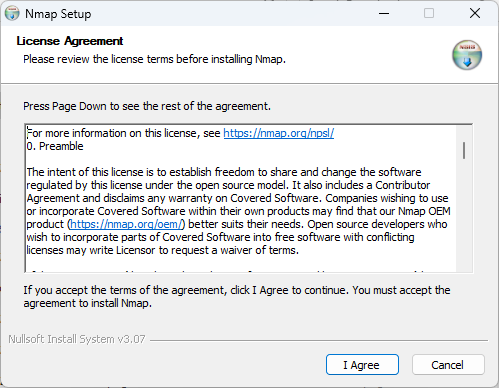
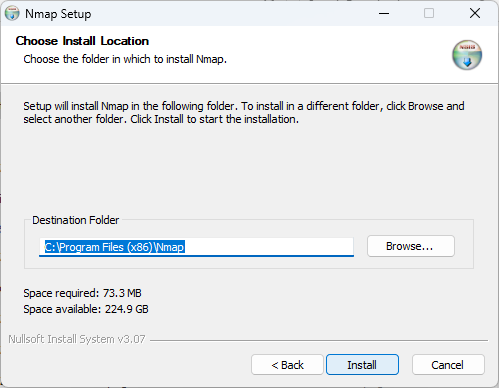
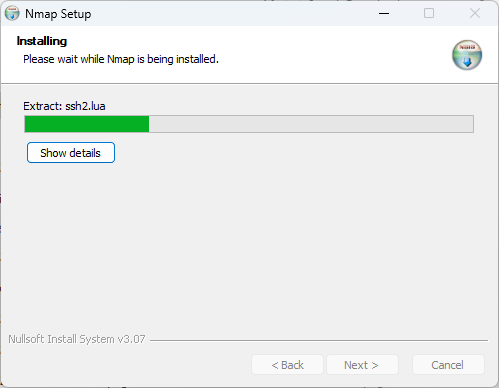
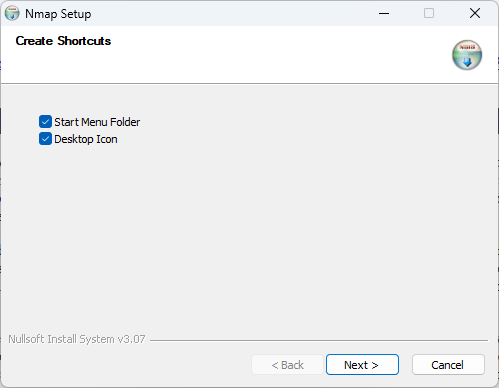
Las siguientes imágenes muestran el proceso de instalación de Nmap (incluyendo Npcap):




Ubuntu (WSL)
Para el caso de un Ubuntu lo que aquí se presenta es una instalación dentro de una máquina virtual dedicada a Windows. Una vez abierta la sesión de Ubuntu, desde la línea de comando (BASH en este caso), se procede con la instalación usando apt-get. La salida a pantalla del proceso es como se ilustra a continuación:
$ sudo apt-get install nmap
Reading package lists... Done
Building dependency tree... Done
Reading state information... Done
The following additional packages will be installed:
  libblas3 liblinear4 liblua5.3-0 lua-lpeg nmap-common
Suggested packages:
  liblinear-tools liblinear-dev ncat ndiff zenmap
The following NEW packages will be installed:
  libblas3 liblinear4 liblua5.3-0 lua-lpeg nmap nmap-common
0 upgraded, 6 newly installed, 0 to remove and 105 not upgraded.
Need to get 5993 kB of archives.
After this operation, 26.5 MB of additional disk space will be used.
Do you want to continue? [Y/n] y
Get:1 http://ports.ubuntu.com/ubuntu-ports jammy/main arm64 libblas3 arm64 3.10.0-2ubuntu1 [141 kB]
Get:2 http://ports.ubuntu.com/ubuntu-ports jammy/universe arm64 liblinear4 arm64 2.3.0+dfsg-5 [37.0 kB]
Get:3 http://ports.ubuntu.com/ubuntu-ports jammy/main arm64 liblua5.3-0 arm64 5.3.6-1build1 [135 kB]
Get:4 http://ports.ubuntu.com/ubuntu-ports jammy/universe arm64 lua-lpeg arm64 1.0.2-1 [30.0 kB]
Get:5 http://ports.ubuntu.com/ubuntu-ports jammy-updates/universe arm64 nmap-common all 7.91+dfsg1+really7.80+dfsg1-2ubuntu0.1 [3940 kB]
Get:6 http://ports.ubuntu.com/ubuntu-ports jammy-updates/universe arm64 nmap arm64 7.91+dfsg1+really7.80+dfsg1-2ubuntu0.1 [1709 kB]
Fetched 5993 kB in 7s (868 kB/s)
Selecting previously unselected package libblas3:arm64.
(Reading database ... 24249 files and directories currently installed.)
Preparing to unpack .../0-libblas3_3.10.0-2ubuntu1_arm64.deb ...
Unpacking libblas3:arm64 (3.10.0-2ubuntu1) ...
Selecting previously unselected package liblinear4:arm64.
Preparing to unpack .../1-liblinear4_2.3.0+dfsg-5_arm64.deb ...
Unpacking liblinear4:arm64 (2.3.0+dfsg-5) ...
Selecting previously unselected package liblua5.3-0:arm64.
Preparing to unpack .../2-liblua5.3-0_5.3.6-1build1_arm64.deb ...
Unpacking liblua5.3-0:arm64 (5.3.6-1build1) ...
Selecting previously unselected package lua-lpeg:arm64.
Preparing to unpack .../3-lua-lpeg_1.0.2-1_arm64.deb ...
Unpacking lua-lpeg:arm64 (1.0.2-1) ...
Selecting previously unselected package nmap-common.
Preparing to unpack .../4-nmap-common_7.91+dfsg1+really7.80+dfsg1-2ubuntu0.1_all.deb ...
Unpacking nmap-common (7.91+dfsg1+really7.80+dfsg1-2ubuntu0.1) ...
Selecting previously unselected package nmap.
Preparing to unpack .../5-nmap_7.91+dfsg1+really7.80+dfsg1-2ubuntu0.1_arm64.deb ...
Unpacking nmap (7.91+dfsg1+really7.80+dfsg1-2ubuntu0.1) ...
Setting up lua-lpeg:arm64 (1.0.2-1) ...
Setting up libblas3:arm64 (3.10.0-2ubuntu1) ...
update-alternatives: using /usr/lib/aarch64-linux-gnu/blas/libblas.so.3 to provide /usr/lib/aarch64-linux-gnu/libblas.so.3 (libblas.so.3-aarch64-linux-gnu) in auto mode
Setting up nmap-common (7.91+dfsg1+really7.80+dfsg1-2ubuntu0.1) ...
Setting up liblua5.3-0:arm64 (5.3.6-1build1) ...
Setting up liblinear4:arm64 (2.3.0+dfsg-5) ...
Setting up nmap (7.91+dfsg1+really7.80+dfsg1-2ubuntu0.1) ...
Processing triggers for man-db (2.10.2-1) ...
Processing triggers for libc-bin (2.35-0ubuntu3.1) ...
$
Para comprobar la instalación, recurrimos a que esta utilería despliegue la versión. Importante señalar que la utilería indica que puede no funcionar como se espera en el entorno de WSL.
$ nmap --version
Warning: Nmap may not work correctly on Windows Subsystem for Linux.
For best performance and accuracy, use the native Windows build from https://nmap.org/download.html#windows.
Nmap version 7.80 ( https://nmap.org )
Platform: aarch64-unknown-linux-gnu
Compiled with: liblua-5.3.6 openssl-3.0.2 nmap-libssh2-1.8.2 libz-1.2.11 libpcre-8.39 libpcap-1.10.1 nmap-libdnet-1.12 ipv6
Compiled without:
Available nsock engines: epoll poll select
$
Ubuntu (Parallels)
Para el caso de una máquina virtual dedicada a Ubuntu, la instalación con apt-get ha sido:
$ sudo apt-get install nmap
Reading package lists... Done
Building dependency tree... Done
Reading state information... Done
The following additional packages will be installed:
  libblas3 liblinear4 lua-lpeg nmap-common
Suggested packages:
  liblinear-tools liblinear-dev ncat ndiff zenmap
The following NEW packages will be installed:
  libblas3 liblinear4 lua-lpeg nmap nmap-common
0 upgraded, 5 newly installed, 0 to remove and 237 not upgraded.
Need to get 5858 kB of archives.
After this operation, 26.0 MB of additional disk space will be used.
Do you want to continue? [Y/n] y
Get:1 http://ports.ubuntu.com/ubuntu-ports jammy/main arm64 libblas3 arm64 3.10.0-2ubuntu1 [141 kB]
Get:2 http://ports.ubuntu.com/ubuntu-ports jammy/universe arm64 liblinear4 arm64 2.3.0+dfsg-5 [37.0 kB]
Get:3 http://ports.ubuntu.com/ubuntu-ports jammy/universe arm64 lua-lpeg arm64 1.0.2-1 [30.0 kB]
Get:4 http://ports.ubuntu.com/ubuntu-ports jammy-updates/universe arm64 nmap-common all 7.91+dfsg1+really7.80+dfsg1-2ubuntu0.1 [3940 kB]
Get:5 http://ports.ubuntu.com/ubuntu-ports jammy-updates/universe arm64 nmap arm64 7.91+dfsg1+really7.80+dfsg1-2ubuntu0.1 [1709 kB]
Fetched 5858 kB in 2s (2687 kB/s)
debconf: delaying package configuration, since apt-utils is not installed
Selecting previously unselected package libblas3:arm64.
(Reading database ... 164278 files and directories currently installed.)
Preparing to unpack .../libblas3_3.10.0-2ubuntu1_arm64.deb ...
Unpacking libblas3:arm64 (3.10.0-2ubuntu1) ...
Selecting previously unselected package liblinear4:arm64.
Preparing to unpack .../liblinear4_2.3.0+dfsg-5_arm64.deb ...
Unpacking liblinear4:arm64 (2.3.0+dfsg-5) ...
Selecting previously unselected package lua-lpeg:arm64.
Preparing to unpack .../lua-lpeg_1.0.2-1_arm64.deb ...
Unpacking lua-lpeg:arm64 (1.0.2-1) ...
Selecting previously unselected package nmap-common.
Preparing to unpack .../nmap-common_7.91+dfsg1+really7.80+dfsg1-2ubuntu0.1_all.deb ...
Unpacking nmap-common (7.91+dfsg1+really7.80+dfsg1-2ubuntu0.1) ...
Selecting previously unselected package nmap.
Preparing to unpack .../nmap_7.91+dfsg1+really7.80+dfsg1-2ubuntu0.1_arm64.deb ...
Unpacking nmap (7.91+dfsg1+really7.80+dfsg1-2ubuntu0.1) ...
Setting up lua-lpeg:arm64 (1.0.2-1) ...
Setting up libblas3:arm64 (3.10.0-2ubuntu1) ...
update-alternatives: using /usr/lib/aarch64-linux-gnu/blas/libblas.so.3 to provide /usr/lib/aarch64-linux-gnu/libblas.so.3 (libblas.so.3-aarch64-linux-gnu) in auto mode
Setting up nmap-common (7.91+dfsg1+really7.80+dfsg1-2ubuntu0.1) ...
Setting up liblinear4:arm64 (2.3.0+dfsg-5) ...
Setting up nmap (7.91+dfsg1+really7.80+dfsg1-2ubuntu0.1) ...
Processing triggers for man-db (2.10.2-1) ...
Processing triggers for libc-bin (2.35-0ubuntu3.1) ...
debconf: unable to initialize frontend: Dialog
debconf: (No usable dialog-like program is installed, so the dialog based frontend cannot be used. at /usr/share/perl5/Debconf/FrontEnd/Dialog.pm line 78.)
debconf: falling back to frontend: Readline
Scanning processes...
Scanning linux images...

Running kernel seems to be up-to-date.

No services need to be restarted.

No containers need to be restarted.

No user sessions are running outdated binaries.

No VM guests are running outdated hypervisor (qemu) binaries on this host.
$ nmap --version
Nmap version 7.80 ( https://nmap.org )
Platform: aarch64-unknown-linux-gnu
Compiled with: liblua-5.3.6 openssl-3.0.2 nmap-libssh2-1.8.2 libz-1.2.11 libpcre-8.39 libpcap-1.10.1 nmap-libdnet-1.12 ipv6
Compiled without:
Available nsock engines: epoll poll select
$
Ubuntu (UTM)
Sobre UTM la instalación de Nmap fue como se ilustra abajo, donde:
- Actualización de
apt. - Actualización de la lista de repositorios de
apty su revisión. - Instalación de
nmap.
To run a command as administrator (user "root"), use "sudo <command>".
See "man sudo_root" for details.

ubuntu@ubuntu:~$ sudo apt-get update
Ign:1 cdrom://Ubuntu 22.04.3 LTS _Jammy Jellyfish_ - Release arm64 (20231029) jammy InRelease
Hit:2 cdrom://Ubuntu 22.04.3 LTS _Jammy Jellyfish_ - Release arm64 (20231029) jammy Release
Hit:4 http://ports.ubuntu.com/ubuntu-ports jammy InRelease
Get:5 http://ports.ubuntu.com/ubuntu-ports jammy-security InRelease [110 kB]
Get:6 http://ports.ubuntu.com/ubuntu-ports jammy-updates InRelease [119 kB]
Get:7 http://ports.ubuntu.com/ubuntu-ports jammy-proposed InRelease [270 kB]
Get:8 http://ports.ubuntu.com/ubuntu-ports jammy/main arm64 Packages [1369 kB]
Get:9 http://ports.ubuntu.com/ubuntu-ports jammy/restricted arm64 Packages [19.6 kB]
Get:10 http://ports.ubuntu.com/ubuntu-ports jammy-security/main arm64 Packages [769 kB]
Get:11 http://ports.ubuntu.com/ubuntu-ports jammy-security/main arm64 DEP-11 Metadata [43.0 kB]
Get:12 http://ports.ubuntu.com/ubuntu-ports jammy-security/restricted arm64 Packages [667 kB]
Get:13 http://ports.ubuntu.com/ubuntu-ports jammy-updates/main arm64 Packages [973 kB]
Get:14 http://ports.ubuntu.com/ubuntu-ports jammy-updates/main arm64 DEP-11 Metadata [101 kB]
Get:15 http://ports.ubuntu.com/ubuntu-ports jammy-updates/restricted arm64 Packages [673 kB]
Get:16 http://ports.ubuntu.com/ubuntu-ports jammy-proposed/main arm64 Packages [182 kB]
Get:17 http://ports.ubuntu.com/ubuntu-ports jammy-proposed/main arm64 DEP-11 Metadata [11.5 kB]
Get:18 http://ports.ubuntu.com/ubuntu-ports jammy-proposed/restricted arm64 Packages [202 kB]
Fetched 5507 kB in 4s (1434 kB/s)
Reading package lists... Done
ubuntu@ubuntu:~$ sudo apt-get install nmap
Reading package lists... Done
Building dependency tree... Done
Reading state information... Done
E: Unable to locate package nmap
ubuntu@ubuntu:~$ sudo apt update
Ign:1 cdrom://Ubuntu 22.04.3 LTS _Jammy Jellyfish_ - Release arm64 (20231029) jammy InRelease
Hit:2 cdrom://Ubuntu 22.04.3 LTS _Jammy Jellyfish_ - Release arm64 (20231029) jammy Release
Hit:4 http://ports.ubuntu.com/ubuntu-ports jammy InRelease
Get:5 http://ports.ubuntu.com/ubuntu-ports jammy-security InRelease [110 kB]
Get:6 http://ports.ubuntu.com/ubuntu-ports jammy-updates InRelease [119 kB]
Get:7 http://ports.ubuntu.com/ubuntu-ports jammy-proposed InRelease [270 kB]
Get:8 http://ports.ubuntu.com/ubuntu-ports jammy-security/main arm64 DEP-11 Metadata [43.1 kB]
Get:9 http://ports.ubuntu.com/ubuntu-ports jammy-updates/main arm64 DEP-11 Metadata [100 kB]
Get:10 http://ports.ubuntu.com/ubuntu-ports jammy-proposed/main arm64 DEP-11 Metadata [11.5 kB]
Fetched 654 kB in 2s (352 kB/s)
Reading package lists... Done
Building dependency tree... Done
Reading state information... Done
All packages are up to date.
ubuntu@ubuntu:~$ sudo apt upgrade /y
Reading package lists... Done
E: Unsupported file /y given on commandline
ubuntu@ubuntu:~$ sudo apt upgrade -y
Reading package lists... Done
Building dependency tree... Done
Reading state information... Done
Calculating upgrade... Done
0 upgraded, 0 newly installed, 0 to remove and 0 not upgraded.
ubuntu@ubuntu:~$ sudo apt-get install nmap
Reading package lists... Done
Building dependency tree... Done
Reading state information... Done
E: Unable to locate package nmap
ubuntu@ubuntu:~$ cat /etc/apt/sources.list
deb cdrom:[Ubuntu 22.04.3 LTS _Jammy Jellyfish_ - Release arm64 (20231029)]/ jammy main restricted
deb http://ports.ubuntu.com/ubuntu-ports/ jammy main restricted
deb http://ports.ubuntu.com/ubuntu-ports/ jammy-security main restricted
deb http://ports.ubuntu.com/ubuntu-ports/ jammy-updates main restricted
ubuntu@ubuntu:~$ sudo add-apt-repository universe
Adding component(s) 'universe' to all repositories.
Press [ENTER] to continue or Ctrl-c to cancel.
Added universe to: deb cdrom:[Ubuntu 22.04.3 LTS _Jammy Jellyfish_ - Release arm64 (20231029)]/ jammy main restricted universe
Added universe to: deb http://ports.ubuntu.com/ubuntu-ports/ jammy main restricted universe
Added universe to: deb http://ports.ubuntu.com/ubuntu-ports/ jammy-security main restricted universe
Added universe to: deb http://ports.ubuntu.com/ubuntu-ports/ jammy-updates main restricted universe
Ign:1 cdrom://Ubuntu 22.04.3 LTS _Jammy Jellyfish_ - Release arm64 (20231029) jammy InRelease
Hit:2 cdrom://Ubuntu 22.04.3 LTS _Jammy Jellyfish_ - Release arm64 (20231029) jammy Release
Hit:4 http://ports.ubuntu.com/ubuntu-ports jammy InRelease
Get:5 http://ports.ubuntu.com/ubuntu-ports jammy-security InRelease [110 kB]
Get:6 http://ports.ubuntu.com/ubuntu-ports jammy-updates InRelease [119 kB]
Get:7 http://ports.ubuntu.com/ubuntu-ports jammy-proposed InRelease [270 kB]
Get:8 http://ports.ubuntu.com/ubuntu-ports jammy/universe arm64 Packages [13.9 MB]
Get:9 http://ports.ubuntu.com/ubuntu-ports jammy/universe Translation-en [5652 kB]
Get:10 http://ports.ubuntu.com/ubuntu-ports jammy/universe arm64 DEP-11 Metadata [3360 kB]
Get:11 http://ports.ubuntu.com/ubuntu-ports jammy/universe DEP-11 48x48 Icons [3447 kB]
Get:12 http://ports.ubuntu.com/ubuntu-ports jammy/universe DEP-11 64x64 Icons [7609 kB]
Get:13 http://ports.ubuntu.com/ubuntu-ports jammy/universe DEP-11 64x64@2 Icons [69.3 kB]
Get:14 http://ports.ubuntu.com/ubuntu-ports jammy/universe arm64 c-n-f Metadata [277 kB]
Get:15 http://ports.ubuntu.com/ubuntu-ports jammy-security/universe arm64 Packages [709 kB]
Get:16 http://ports.ubuntu.com/ubuntu-ports jammy-security/universe Translation-en [145 kB]
Get:17 http://ports.ubuntu.com/ubuntu-ports jammy-security/universe arm64 DEP-11 Metadata [54.8 kB]
Get:18 http://ports.ubuntu.com/ubuntu-ports jammy-security/universe DEP-11 48x48 Icons [22.0 kB]
Get:19 http://ports.ubuntu.com/ubuntu-ports jammy-security/universe DEP-11 64x64 Icons [34.6 kB]
Get:20 http://ports.ubuntu.com/ubuntu-ports jammy-security/universe DEP-11 64x64@2 Icons [29 B]
Get:21 http://ports.ubuntu.com/ubuntu-ports jammy-security/universe arm64 c-n-f Metadata [14.1 kB]
Get:22 http://ports.ubuntu.com/ubuntu-ports jammy-updates/universe arm64 Packages [908 kB]
Get:23 http://ports.ubuntu.com/ubuntu-ports jammy-updates/universe Translation-en [218 kB]
Get:24 http://ports.ubuntu.com/ubuntu-ports jammy-updates/universe arm64 DEP-11 Metadata [301 kB]
Get:25 http://ports.ubuntu.com/ubuntu-ports jammy-updates/universe DEP-11 48x48 Icons [205 kB]
Get:26 http://ports.ubuntu.com/ubuntu-ports jammy-updates/universe DEP-11 64x64 Icons [311 kB]
Get:27 http://ports.ubuntu.com/ubuntu-ports jammy-updates/universe DEP-11 64x64@2 Icons [29 B]
Get:28 http://ports.ubuntu.com/ubuntu-ports jammy-updates/universe arm64 c-n-f Metadata [19.3 kB]
Fetched 37.7 MB in 8s (4728 kB/s)
Reading package lists... Done
W: Skipping acquire of configured file 'universe/binary-arm64/Packages' as repository 'cdrom://Ubuntu 22.04.3 LTS _Jammy Jellyfish_ - Release arm64 (20231029) jammy InRelease' doesn't have the component 'universe' (component misspelt in sources.list?)
W: Skipping acquire of configured file 'universe/i18n/Translation-en' as repository 'cdrom://Ubuntu 22.04.3 LTS _Jammy Jellyfish_ - Release arm64 (20231029) jammy InRelease' doesn't have the component 'universe' (component misspelt in sources.list?)
W: Skipping acquire of configured file 'universe/dep11/Components-arm64.yml' as repository 'cdrom://Ubuntu 22.04.3 LTS _Jammy Jellyfish_ - Release arm64 (20231029) jammy InRelease' doesn't have the component 'universe' (component misspelt in sources.list?)
W: Skipping acquire of configured file 'universe/dep11/icons-48x48.tar' as repository 'cdrom://Ubuntu 22.04.3 LTS _Jammy Jellyfish_ - Release arm64 (20231029) jammy InRelease' doesn't have the component 'universe' (component misspelt in sources.list?)
W: Skipping acquire of configured file 'universe/dep11/icons-64x64.tar' as repository 'cdrom://Ubuntu 22.04.3 LTS _Jammy Jellyfish_ - Release arm64 (20231029) jammy InRelease' doesn't have the component 'universe' (component misspelt in sources.list?)
W: Skipping acquire of configured file 'universe/dep11/icons-64x64@2.tar' as repository 'cdrom://Ubuntu 22.04.3 LTS _Jammy Jellyfish_ - Release arm64 (20231029) jammy InRelease' doesn't have the component 'universe' (component misspelt in sources.list?)
W: Skipping acquire of configured file 'universe/cnf/Commands-arm64' as repository 'cdrom://Ubuntu 22.04.3 LTS _Jammy Jellyfish_ - Release arm64 (20231029) jammy InRelease' doesn't have the component 'universe' (component misspelt in sources.list?)
ubuntu@ubuntu:~$ cat /etc/apt/sources.list
deb cdrom:[Ubuntu 22.04.3 LTS _Jammy Jellyfish_ - Release arm64 (20231029)]/ jammy restricted universe main
deb http://ports.ubuntu.com/ubuntu-ports/ jammy restricted universe main
deb http://ports.ubuntu.com/ubuntu-ports/ jammy-security restricted universe main
deb http://ports.ubuntu.com/ubuntu-ports/ jammy-updates restricted universe main
ubuntu@ubuntu:~$ sudo apt-get install nmap
Reading package lists... Done
Building dependency tree... Done
Reading state information... Done
The following additional packages will be installed:
  libblas3 liblinear4 lua-lpeg nmap-common
Suggested packages:
  liblinear-tools liblinear-dev ncat ndiff zenmap
The following NEW packages will be installed:
  libblas3 liblinear4 lua-lpeg nmap nmap-common
0 upgraded, 5 newly installed, 0 to remove and 0 not upgraded.
Need to get 5858 kB of archives.
After this operation, 26.0 MB of additional disk space will be used.
Do you want to continue? [Y/n] y
Get:1 http://ports.ubuntu.com/ubuntu-ports jammy/main arm64 libblas3 arm64 3.10.0-2ubuntu1 [141 kB]
Get:2 http://ports.ubuntu.com/ubuntu-ports jammy/universe arm64 liblinear4 arm64 2.3.0+dfsg-5 [37.0 kB]
Get:3 http://ports.ubuntu.com/ubuntu-ports jammy/universe arm64 lua-lpeg arm64 1.0.2-1 [30.0 kB]
Get:4 http://ports.ubuntu.com/ubuntu-ports jammy-updates/universe arm64 nmap-common all 7.91+dfsg1+really7.80+dfsg1-2ubuntu0.1 [3940 kB]
Get:5 http://ports.ubuntu.com/ubuntu-ports jammy-updates/universe arm64 nmap arm64 7.91+dfsg1+really7.80+dfsg1-2ubuntu0.1 [1709 kB]
Fetched 5858 kB in 2s (3309 kB/s)
Selecting previously unselected package libblas3:arm64.
(Reading database ... 210740 files and directories currently installed.)
Preparing to unpack .../libblas3_3.10.0-2ubuntu1_arm64.deb ...
Unpacking libblas3:arm64 (3.10.0-2ubuntu1) ...
Selecting previously unselected package liblinear4:arm64.
Preparing to unpack .../liblinear4_2.3.0+dfsg-5_arm64.deb ...
Unpacking liblinear4:arm64 (2.3.0+dfsg-5) ...
Selecting previously unselected package lua-lpeg:arm64.
Preparing to unpack .../lua-lpeg_1.0.2-1_arm64.deb ...
Unpacking lua-lpeg:arm64 (1.0.2-1) ...
Selecting previously unselected package nmap-common.
Preparing to unpack .../nmap-common_7.91+dfsg1+really7.80+dfsg1-2ubuntu0.1_all.deb ...
Unpacking nmap-common (7.91+dfsg1+really7.80+dfsg1-2ubuntu0.1) ...
Selecting previously unselected package nmap.
Preparing to unpack .../nmap_7.91+dfsg1+really7.80+dfsg1-2ubuntu0.1_arm64.deb ...
Unpacking nmap (7.91+dfsg1+really7.80+dfsg1-2ubuntu0.1) ...
Setting up lua-lpeg:arm64 (1.0.2-1) ...
Setting up libblas3:arm64 (3.10.0-2ubuntu1) ...
update-alternatives: using /usr/lib/aarch64-linux-gnu/blas/libblas.so.3 to provide /usr/lib/aarch64-linux-gnu/libblas.so.3 (libblas.so.3-aarch64-linux-gnu) in auto mode
Setting up nmap-common (7.91+dfsg1+really7.80+dfsg1-2ubuntu0.1) ...
Setting up liblinear4:arm64 (2.3.0+dfsg-5) ...
Setting up nmap (7.91+dfsg1+really7.80+dfsg1-2ubuntu0.1) ...
Processing triggers for man-db (2.10.2-1) ...
Processing triggers for libc-bin (2.35-0ubuntu3.4) ...
ubuntu@ubuntu:~$ nmap --version
Nmap version 7.80 ( https://nmap.org )
Platform: aarch64-unknown-linux-gnu
Compiled with: liblua-5.3.6 openssl-3.0.2 nmap-libssh2-1.8.2 libz-1.2.11 libpcre-8.39 libpcap-1.10.1 nmap-libdnet-1.12 ipv6
Compiled without:
Available nsock engines: epoll poll select
ubuntu@ubuntu:~$
macOS
Similarmente, para el caso de macOS, se tienen las tres opciones de instalación ya mencionadas: haciendo uso de un instalador, un administrador de paquetes y compilando el código fuente. Se describen las opciones probadas.
Desde código fuente (sin zenmap)
La instalación de Nmap mediante la compilación del código fuente requiere tener instalado XCode más algunas bibliotecas que pueden ser instaladas con MacPorts o Homebrew, según se indica en la documentación al respecto1-3. El proceso a seguir es el tradicional de configuración, compilación e instalación (ver sección «Source Code Distribution» en [1]) pero conviene familiarizarse con las «Configure Directives» indicadas en [2]. Aquí se describe la particular experiencia de haberlo hecho inicialmente en Sonoma y repetido en Sequoia, y en ambos casos contando ya con varios de los requisitos de instalación (algunas bibliotecas de desarrollo se tenían instaladas por contar con mini Conda), por lo que se buscó validar si podrían ser usadas (sin reinstalarlas nuevamente).
1: Tras descargar el tarball y proceder con su descompactación, desde el directorio creado, se procedió en un primer intento con:
(base) $ ./configure
checking whether NLS is requested... yes
checking build system type... arm-apple-darwin23.4.0
checking host system type... arm-apple-darwin23.4.0
checking for gcc... gcc
...
checking openssl/ssl.h usability... no
checking openssl/ssl.h presence... no
checking for openssl/ssl.h... no
configure: WARNING: Failed to find openssl/ssl.h so OpenSSL will not be used. If it is installed you can try the --with-openssl=DIR argument
checking pcap.h usability... yes
...
Configured with: ndiff zenmap nping zlib lua ncat
Configured without: localdirs openssl libssh2
Type make (or gmake on some *BSD machines) to compile.
WARNING: You are compiling without OpenSSL
WARNING: You are compiling without LibSSH2
(base) $
Varios warnings se reportaron a lo largo del proceso de configuración pero dos de ellos se destacaron al final. Usualmente la respuesta a esto (instalar las utilerías faltantes) es hacerlo mediante MacPorts o Homebrew. Para el caso que aquí relatamos, sabiendo que se contaba con OpenSSL, se procedió a determinar donde se encontraba ésta:
(base)$ which OpenSSL
/Users/lalo/Applications/MiniConda3/miniconda3/bin/OpenSSL
Y se procedió a hacer uso de la respectiva directiva para incluirla (con lo que se solucionó el otro warning también).
(base) $ ./configure --with-openssl=/Users/lalo/Applications/MiniConda3/miniconda3
checking whether NLS is requested... yes
checking build system type... arm-apple-darwin23.4.0
checking host system type... arm-apple-darwin23.4.0
checking for gcc... gcc
...
Configured with: ndiff zenmap nping openssl zlib libssh2 lua ncat
Configured without: localdirs
Type make (or gmake on some *BSD machines) to compile.
(base) $
2: El proceso de compilación mostró varios warnings sobre funciones ya obsoletas (deprecated) que no es raro ver en estos menesteres, pero una serie de errores detuvieron el proceso.
(base) $ make
g++ -MM -I./liblinear -I./liblua -I./libdnet-stripped/include -I./libpcre  -I/Users/lalo/Applications/MiniConda3/miniconda3/include -I./libpcap -I./nbase -I./nsock/include -DHAVE_CONFIG_H -DNMAP_PLATFORM=\"arm-apple-darwin23.4.0\" -DNMAPDATADIR=\"/usr/local/share/nmap\" -D_FORTIFY_SOURCE=2 charpool.cc FingerPrintResults.cc FPEngine.cc FPModel.cc idle_scan.cc MACLookup.cc main.cc nmap.cc nmap_dns.cc nmap_error.cc nmap_ftp.cc NmapOps.cc NmapOutputTable.cc nmap_tty.cc osscan2.cc osscan.cc output.cc payload.cc portlist.cc portreasons.cc protocols.cc scan_engine.cc scan_engine_connect.cc scan_engine_raw.cc scan_lists.cc service_scan.cc services.cc string_pool.cc Target.cc NewTargets.cc TargetGroup.cc targets.cc tcpip.cc timing.cc traceroute.cc utils.cc xml.cc nse_main.cc nse_utility.cc nse_nsock.cc nse_db.cc nse_dnet.cc nse_fs.cc nse_nmaplib.cc nse_debug.cc nse_pcrelib.cc nse_lpeg.cc nse_openssl.cc nse_ssl_cert.cc nse_libssh2.cc nse_zlib.cc > makefile.dep
Compiling libnetutil
...
In file included from /Library/Developer/CommandLineTools/SDKs/MacOSX.sdk/usr/include/c++/v1/iterator:721:
./libpcap/version:1:1: error: expected unqualified-id
1.10.4
^
fatal error: too many errors emitted, stopping now [-ferror-limit=]
20 errors generated.
make: *** [charpool.o] Error 1
(base) $
3: El mensaje de error da lugar a cierta confusion6 pero el problema se arregla dando la ruta a los archivos de cabecera desde el ./configure.
(base) $ ./configure --with-openssl=/Users/lalo/Applications/MiniConda3/miniconda3 --includedir=/Library/Developer/CommandLineTools/SDKs/MacOSX.sdk/usr/include/ --without-zenmap
...
checking lua/lua.h presence... no
checking for lua/lua.h... no
checking for library containing lua_isyieldable... no
checking for lua version >= 504... no
configure: creating ./config.status
config.status: creating Makefile
config.status: creating config.h
config.status: config.h is unchanged
            .       .
            \`-"'"-'/
             } 6 6 {
            ==. Y ,==
              /^^^\  .
             /     \  )  Ncat: A modern interpretation of classic Netcat
            (  )-(  )/
            -""---""---   /
           /   Ncat    \_/
          (     ____
           \_.=|____E
Configuration complete.

                    ___.-------.___
                _.-' ___.--;--.___ `-._
             .-' _.-'  /  .+.  \  `-._ `-.
           .' .-'      |-|-o-|-|      `-. `.
          (_ <O__      \  `+'  /      __O> _)
            `--._``-..__`._|_.'__..-''_.--'
                  ``--._________.--''
   ____  _____  ____    ____       _       _______
  |_   \|_   _||_   \  /   _|     / \     |_   __ \
    |   \ | |    |   \/   |      / _ \      | |__) |
    | |\ \| |    | |\  /| |     / ___ \     |  ___/
   _| |_\   |_  _| |_\/_| |_  _/ /   \ \_  _| |_
  |_____|\____||_____||_____||____| |____||_____|

  NMAP IS A POWERFUL TOOL -- USE CAREFULLY AND RESPONSIBLY
Configured with: ndiff nping openssl zlib libssh2 lua ncat
Configured without: localdirs zenmap
Type make (or gmake on some *BSD machines) to compile.
(base) $
4: Con la configuración obtenida, se procedió a limpiar y recompilar:
(base) $ make clean
cd liblua && /Library/Developer/CommandLineTools/usr/bin/make clean
rm -f liblua.a lua luac lapi.o lcode.o lctype.o ldebug.o ldo.o ldump.o lfunc.o lgc.o llex.o lmem.o lobject.o lopcodes.o lparser.o lstate.o lstring.o ltable.o ltm.o lundump.o lvm.o lzio.o lauxlib.o lbaselib.o lcorolib.o ldblib.o liolib.o lmathlib.o loadlib.o loslib.o lstrlib.o ltablib.o lutf8lib.o linit.o  lua.o luac.o
cd liblinear && /Library/Developer/CommandLineTools/usr/bin/make clean
make -C blas clean
...
(base) $ make
Compiling libnetutil
cd libnetutil && /Library/Developer/CommandLineTools/usr/bin/make
g++ -c -I../liblinear -I../liblua -I../libdnet-stripped/include  -I/Users/lalo/Applications/MiniConda3/miniconda3/include -I../libpcap -I../nbase -I../nsock/include -DHAVE_CONFIG_H -D_FORTIFY_SOURCE=2 -no-cpp-precomp -g -O2 -Wall -fno-strict-aliasing netutil.cc -o netutil.o
...
gcc -I./../liblua -I/Users/lalo/Applications/MiniConda3/miniconda3/include  -I../libpcap -DHAVE_CONFIG_H -DNCAT_DATADIR="\"/usr/local/share/ncat\"" -D_FORTIFY_SOURCE=2 -I. -I.. -I../nsock/include/ -I../nbase -DLUA_USE_POSIX -DLUA_USE_DLOPEN -DHAVE_LUA=1 -I../liblua -g -O2 -Wall -c ncat_lua.c -o ncat_lua.o
gcc -o ncat -g -O2 -Wall  -L../libpcap  -L/Users/lalo/Applications/MiniConda3/miniconda3/lib ncat_main.o ncat_connect.o ncat_core.o ncat_posix.o ncat_listen.o ncat_proxy.o ncat_ssl.o base64.o http.o util.o sys_wrap.o http_digest.o ncat_lua.o ../nsock/src/libnsock.a ../nbase/libnbase.a -lssl -lcrypto -lpcap ./../liblua/liblua.a -lm
(base) $
5: En este punto no hay mayor aviso que el que no se hayan presentado mensajes de error, por lo que resta tan solo probar el resultado obtenido.
(base) $ nmap -h
Desde código fuente (con zenmap)
Zenmap es una interfáz gráfica que permite apreciar mucho más fácilmente lo que nmap descubre y recolecta, pero su compilación desde los fuentes ha resultado problemática y sin exito.
Desinstalaciones
El cómo remover Nmap dependerá de la forma como se haya instalado:
- Si se hizo con un instalador, lo mejor es hacer su desinstalación usando la opción (o script) de desinstalación de dicho instalador, o la funciones administrativas de administración de software (aplicaciones) del sistema operativo.
- Si se realizó mediante un administrador de paquetes, se deberá desinstalar haciendo uso de dicho administrador de paquetes.
- Si se hizo compilando desde el código fuente, deberá hacerse mediante alguna opción prevista en los scripts de compilación o manualmente.
Después de la desinstalación, el reinicio del equipo es algo recomendable de hacer.
Windows
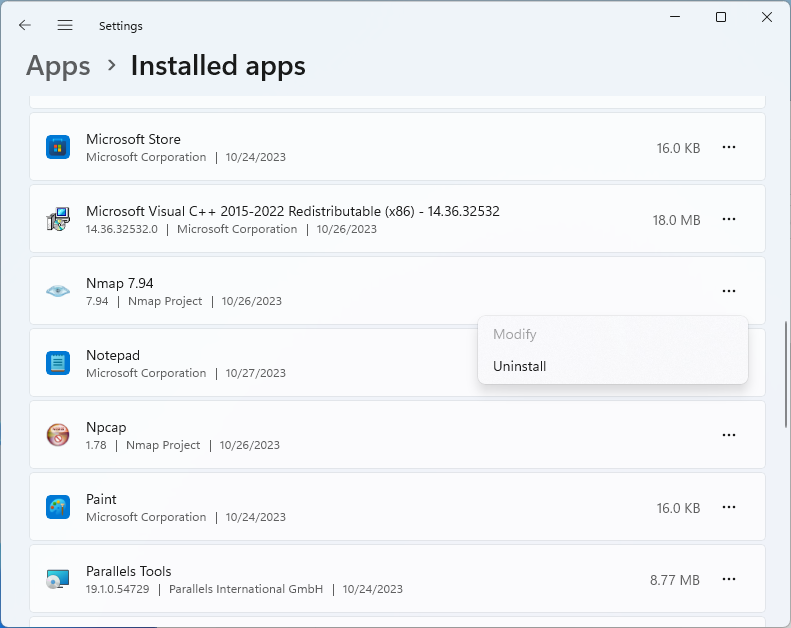
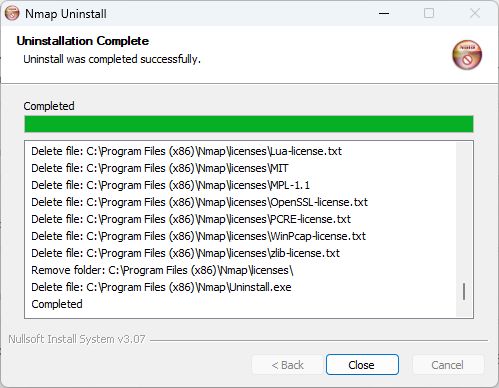
Si la colocación de Nmap se hizo con un instalador, deberá recurrirse a Settings > Apps > Installed apps, seleccionar la aplicación y dar click en «…» para ver la opción «Uninstall«, aceptar la desinstalación y el resto es seguir las posibles instrucciones que se muestren. Las imágenes abajo mostradas ilustran el proceso seguido.




macOS
Similarmente, dependerá de la forma como se instaló Nmap para proceder adecuadamente con su desistalación.
De la compilación de código fuente
En el caso de que se haya hecho una instalación a partir de la compilación del código fuente, el mismo Makefile deberá servir (en este ejempllo se ha echo uso de una cuenta con capacidad de hacer sudo.
% sudo make uninstall
Password:
rm -f /usr/local/bin/nmap
rm -f /usr/local/share/man/man1/nmap.1
rm -f /usr/local/share/man/*/man1/nmap.1
rm -rf /usr/local/share/nmap
/Users/lalo/Applications/MiniConda3/miniconda3/envs/nmap/bin/python3 -m pip uninstall zenmap
WARNING: The directory '/Users/admin/Library/Caches/pip' or its parent directory is not owned or is not writable by the current user. The cache has been disabled. Check the permissions and owner of that directory. If executing pip with sudo, you should use sudo's -H flag.
Found existing installation: zenmap 7.95
Uninstalling zenmap-7.95:
...
Removing 'INSTALLED_FILES'.
rm -f /usr/local/bin/nping
rm -f /usr/local/share/man/man1/nping.1
%
Uso
En desarrollo…

Referencias
- «Downloading Nmap«, nmap.org, web. Visited: 2024.04.21. URL: https://nmap.org/download.html.
- «Linux/Unix Compilation and Installation from Source Code«, nmap.org, web. Visited: 2024.04.21. URL: https://nmap.org/book/inst-source.html.
- «Apple Mac OS X«, nmap.org, web. Visited: 2024.04.21. URL: https://nmap.org/book/inst-macosx.html.
- Manish Shivanandhan, «Nmap — A Guide To The Greatest Scanning Tool Of All Time«, medium.com, web. Published: 20202.06.22; visited: 2023.10.27. URL: https://medium.com/manishmshiva/nmap-a-guide-to-the-greatest-scanning-tool-of-all-time-3bd1a973a5e5.
- Gordon Lyon, «Nmap Network Scanning«, Nmap Project Ed., 2009, pp. 468, ISBN: 978-0979958717. URL: https://nmap.org/book/, TOC.
- «./libpcap/version:1:1: error: expected unqualified-id when running make on Mac«, github.com, nmap repository, issue 2747, comment. Opened by Todd Erickson on 2023.11.21; commented by Eduardo René Rodríguez Ávila on 2024.04.23. URL: https://github.com/nmap/nmap/issues/2747.
- URL: https://pypi.org/project/build/
- URL: https://medium.com/@eyupcebe/nmap-network-mapper-99dd8531db0
- URL: https://nmap.org/book/inst-source.html
- URL: https://nmap.org/book/inst-macosx.html
|
© Todos los derechos reservados. Dr. Eduardo René Rodríguez Avila |
Creación: 2021.01.12 Última actualización: 2024.12.13 |
|||
| El contenido de este sitio puede ser copiado y reproducido libremente mientras no sea alterado y se cite su origen. Marcas y productos registrados son citados por referencia y sin fines de lucro o dolo. Todas las opiniones son a título personal del o los autores de éstas y, salvo sea expresado de otro modo, deben considerarse como registro y expresión de la experiencia de uso de aquello que es tratado. Para conocer más sobre la posición de privacidad y responsabilidad de lo que se presenta en este sitio web y como ha sido obtenido, consulte la declaración al respecto. | |||||


 Dr. Edu