
Como se mencionaba en el correo previo, Mail detecta si el mensaje incluye una opción de «desubscripción apropiada». De acuerdo con lo que documenta Apple, esta opción se muestra cuando Mail detecta que el mensaje proviene de una “mailing list”, lo cual requiere que el mensaje contenga el encabezado List-Unsubscribe1. Esto es práctico, pero los spammers2 difícilmente lo usan.
El no cumplir con el RFC 8058 no es un impedimento legal2, el cumplimiento de los mandatos legales puede alcanzarse mientras la opción sea ofrecida al receptor del mensaje y esta sea visible. Ahora, «ser visible» para el ser humano es una cosa pero para el computador es otra. Por ejemplo, esto es lo que usualmente vemos en un correo de este tipo:
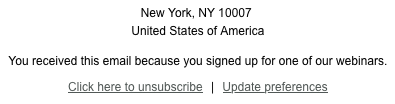
Pero el código detrás de esto luce:
<a href=3D"https://rdarppz.clicks.mlsend.com/tb/c/eyJ2Ijoie1wiYVwiOjE2MjU4O=
TEsXCJsXCI6MTgyNDAxNDgxNzY3Mzg4MTk5LFwiclwiOjE4MjQwMTQ5MjQ1NDQ3NTI3Mn0iLCJz=
IjoiNWU2ZjdiMzY1YmE4ZmI0NiJ9" style=3D"color: #515856; font-weight: normal;=
 font-style: normal; text-decoration: underline;" data-link-id=3D"182401481=
767388199" data-link-type=3D"unsubscribe">Click
 here to unsubscribe</a>

Lo anterior es sólo un ejemplo. Hay muchas formas en las que los spammers arreglan u ofuscan el código para dificultar el filtrado de sus mensajes3,4. El siguiente script cubre algunas de estas posibilidades (está aún en desarrollo). Si se tiene seleccionado un mensaje en Mail, al ejecutarlo, el script copiará la dirección de correo del destinatario y buscará un enlace para desubscribirse.
Si el enlace existe, abrirá Safari con él y la dirección de correo del destinatario estará en el portapapeles para solo hacer paste con ella.
use AppleScript version "2.7"
use framework "Foundation"
use scripting additions
tell application "Mail"
set selectedMessages to selection
if (count of selectedMessages) is not 1 then
display dialog "Please select exactly one email message in Mail." buttons {"OK"} default button "OK" with icon caution
return
end if
set theMessage to item 1 of selectedMessages
-- Get the receiver address (first address in To:)
set receiverAddress to my firstToAddressFromMessage(theMessage)
if receiverAddress is missing value or receiverAddress is "" then
display dialog "Could not determine the receiver email address from the selected message." buttons {"OK"} default button "OK" with icon caution
return
end if
set the clipboard to receiverAddress
-- Get raw source and normalize some common quoted-printable artifacts
set rawSource to source of theMessage
end tell
set normalizedSource to my normalizeMessageSource(rawSource)
set unsubscribeURL to my findUnsubscribeURL(normalizedSource)
if unsubscribeURL is missing value or unsubscribeURL is "" then
display dialog "No unsubscribe link was found in the selected message." buttons {"OK"} default button "OK" with icon caution
return
end if
set unsubscribeURL to my basicHTMLDecode(unsubscribeURL)
-- Open Safari with the extracted URL
tell application "Safari"
activate
if (count of windows) = 0 then
make new document with properties {URL:unsubscribeURL}
else
set URL of front document to unsubscribeURL
end if
end tell
on firstToAddressFromMessage(theMessage)
tell application "Mail"
try
set theRecipients to to recipients of theMessage
repeat with r in theRecipients
try
set a to address of r
if a is not missing value and a is not "" then return a
end try
end repeat
end try
try
set rawSource to source of theMessage
on error
return missing value
end try
end tell
set unfoldedHeaders to my unfoldRFCHeaders(rawSource)
set headerValue to my firstCaptureGroup(unfoldedHeaders, "(?im)^To:\\s*(.+)$", 1)
if headerValue is not missing value then
set parsedEmail to my firstEmailAddressInText(headerValue)
if parsedEmail is not missing value then return parsedEmail
end if
set headerValue to my firstCaptureGroup(unfoldedHeaders, "(?im)^Delivered-To:\\s*(.+)$", 1)
if headerValue is not missing value then
set parsedEmail to my firstEmailAddressInText(headerValue)
if parsedEmail is not missing value then return parsedEmail
end if
set headerValue to my firstCaptureGroup(unfoldedHeaders, "(?im)^X-Original-To:\\s*(.+)$", 1)
if headerValue is not missing value then
set parsedEmail to my firstEmailAddressInText(headerValue)
if parsedEmail is not missing value then return parsedEmail
end if
return missing value
end firstToAddressFromMessage
on unfoldRFCHeaders(theText)
set s to current application's NSString's stringWithString:theText
set s to s's stringByReplacingOccurrencesOfString:("
" & tab) withString:" "
set s to s's stringByReplacingOccurrencesOfString:("
") withString:" "
set s to s's stringByReplacingOccurrencesOfString:("
" & tab) withString:" "
set s to s's stringByReplacingOccurrencesOfString:("
") withString:" "
return (s as text)
end unfoldRFCHeaders
on normalizeMessageSource(theText)
set s to current application's NSString's stringWithString:theText
set s to s's stringByReplacingOccurrencesOfString:("=
") withString:""
set s to s's stringByReplacingOccurrencesOfString:("=
") withString:""
set s to s's stringByReplacingOccurrencesOfString:("=
") withString:""
set s to s's stringByReplacingOccurrencesOfString:"=3D" withString:"=" options:(current application's NSCaseInsensitiveSearch) range:{location:0, |length|:s's |length|()}
return (s as text)
end normalizeMessageSource
on findUnsubscribeURL(theText)
-- Case 1: keyword is in the <a> attributes or inside the <a> text
set hrefValue to my firstCaptureGroup(theText, "(?is)<a\\b(?=[^>]*\\b(?:unsubscribe|desuscribirse|desubscribirse)\\b|[^>]*>(?:(?!</a>).)*?\\b(?:unsubscribe|desuscribirse|desubscribirse)\\b)[^>]*\\bhref\\s*=\\s*(['\"])([^'\"<>]*)\\1[^>]*>(?:(?!</a>).)*?</a>", 2)
if hrefValue is not missing value then return hrefValue
-- Case 2: keyword is in surrounding text inside the same container, then an <a> appears
set hrefValue to my firstCaptureGroup(theText, "(?is)<([a-z][a-z0-9]*)\\b[^>]*>(?:(?!</\\1>).)*?\\b(?:unsubscribe|desuscribirse|desubscribirse)\\b(?:(?!</\\1>).)*?<a\\b[^>]*\\bhref\\s*=\\s*(['\"])([^'\"<>]*)\\2[^>]*>(?:(?!</a>).)*?</a>(?:(?!</\\1>).)*?</\\1>", 3)
if hrefValue is not missing value then return hrefValue
return missing value
end findUnsubscribeURL
on firstEmailAddressInText(theText)
return my firstCaptureGroup(theText, "(?i)([A-Z0-9._%+\\-]+@[A-Z0-9.\\-]+\\.[A-Z]{2,})", 1)
end firstEmailAddressInText
on basicHTMLDecode(theText)
set s to current application's NSString's stringWithString:theText
set s to s's stringByReplacingOccurrencesOfString:"&" withString:"&"
set s to s's stringByReplacingOccurrencesOfString:"<" withString:"<"
set s to s's stringByReplacingOccurrencesOfString:">" withString:">"
set s to s's stringByReplacingOccurrencesOfString:""" withString:"\""
set s to s's stringByReplacingOccurrencesOfString:"'" withString:"'"
return (s as text)
end basicHTMLDecode
on firstCaptureGroup(theText, thePattern, groupIndex)
set nsText to current application's NSString's stringWithString:theText
set fullRange to current application's NSMakeRange(0, nsText's |length|())
set {theRegex, theError} to current application's NSRegularExpression's regularExpressionWithPattern:thePattern options:0 |error|:(reference)
if theRegex is missing value then error ("Regex error: " & (theError's localizedDescription() as text))
set theMatch to theRegex's firstMatchInString:nsText options:0 range:fullRange
if theMatch is missing value then return missing value
set capRange to (theMatch's rangeAtIndex:groupIndex) as record
if (location of capRange) = current application's NSNotFound then return missing value
return (nsText's substringWithRange:(current application's NSMakeRange((location of capRange), (|length| of capRange)))) as text
end firstCaptureGroup
Referencias
- «Signaling One-Click Functionality for List Email Headers«, Internet Engineering Task Force (IETF), web. Published: 2017.01.01; visited: 2026.03.19. URL: https://datatracker.ietf.org/doc/html/rfc8058.
- «What is Spammer», arimetrics.com, web. Visited: 2026.03.19. URL: https://www.arimetrics.com/en/digital-glossary/spammer.
- «Email Spam«, Wikipedia, web. Visited: 2026.03.19. URL: https://en.wikipedia.org/wiki/Email_spam.
- «5 Ways to Avoid Email Spam Filters«, Informatics, Inc., web. Published: 2015.04.18; visited: 2026.03.19. URL: https://www.informaticsinc.com/blog/2015/5-ways-avoid-email-spam-filters.
Siguiente

 Dr. Edu