
I know this topic could be of interest to people who can’t read the original post in Spanish. So, I decided to provide a brief translation in English. Essentially the problem was about an unsupported version of the Apple’s Airport Utility which stop working, again. That version was particularly useful because it was the last one to support old Airport Extreme Base Station models.

Previously, I was able to use the Airport Utility v5.6.1 in Mavericks (OS X 10.9) thanks to the instructions I found some time ago in a blog. Unfortunately, this utility stopped working again, sure due to the regular updates of the operating system. I was able to make this utility works again but this time required a little bit more effort as the previous one. So this is the story.
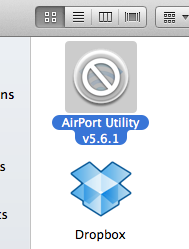
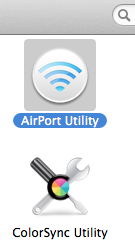
First, the Airport Utility v5.6.1 was showing a crossed circle. Current Airport Utility 6.3.2 version (in /Applications) has not this circle, so this was a sign of troubles.
 |
 |
As expected, this utility couldn’t be started.
 After some tries and manoeuvrings, I had this clue
dyld: Symbol not found: _wlScanAuthenticationModesArray
Referenced from: /Users/rob/Desktop/AirPort Utility 5.6.1.app/Contents/MacOS/AirPort Utility
Expected in: /System/Library/PrivateFrameworks/Apple80211.framework/Versions/A/Apple80211
Despite the referenced library was present, the reported symbol was not in there. So I’d proceeded to do these steps:
- I made a copy of the Airport Utility v5.6.1.
- I made a copy of
/System/Library/PrivateFrameworks/Apple80211.frameworkfrom an OS X 10.8 distribution I still have. - Using Terminal.app I went were my copy of Airport Utility v5.6.1 was and I did the following (where
<text>are values to change):
cd <path to Airport Utility v5.6.1 copied>

cd <name of copy>.app

cd Contents

mkdir Frameworks

cp -rf <source>/Apple80211.framework Frameworks

cd MacOS

install_name_tool -change /System/Library/PrivateFrameworks/Apple80211.framework/Versions/A/Apple80211 @executable_path/../Frameworks/Apple80211.framework/Versions/A/Apple80211 ./AirPort\ Utility

cd ..

sudo chown -R root Frameworks

sudo chgrp -R wheel Frameworks
It was necesarfy to do some adjustments in info.plist to avoid the error message in Finder. In this case, using XCode, I edited the file with right click (or cmd+click) to show the package contents
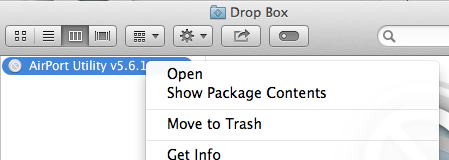
Inside Contents was this file. I looked for the key shown as BundleIdentifier, which value com.apple.airport.airportutility was change to com.apple.airport.airportutility2. The key Bundle creator OS Type code with value 1wcu was changed to 2wcu. So these keys and values are now:
<key>CFBundleIdentifier</key>

<string>com.apple.airport.airportutility2</string>

...

<key>CFBundleSignature</key>

<string>2wcu</string>
Finally, It was necesary to sign the application. For this, using Keychain Access, the Certificate Assistant was called:
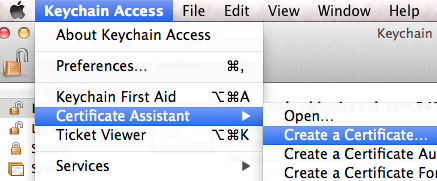
The certificate name can be anything…

Confirm the action …

… and done.

After this, to sign the application …
codesign -s <nombre-del-certificado> -f <ruta y nombre de la copia de Airport Utility v5.6.1>.app
as example, where the copy of the utility was, this command was:
$codesign -s AirportUtilityv561 -f Airport\ Utility\ v5.6.1.app

Airport Utility v5.6.1.app: replacing existing signature
so this useful piece of software is working again:
 I hope this was so useful for you as It was for me. Remember, these instructions are provided «as is» and you use them at your own risk.

 Dr. Edu